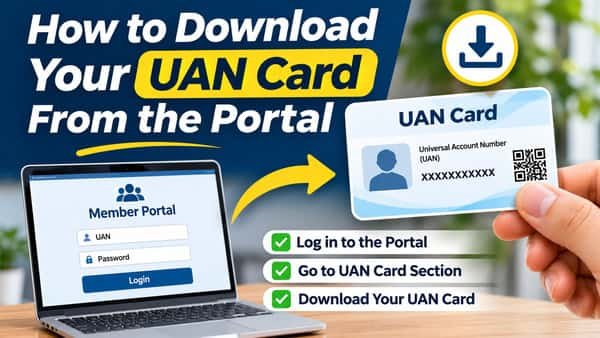
How to download your UAN card from the portal surprises people for one simple reason: there’s no physical card to wait for. EPFO doesn’t post a plastic card to anyone. The UAN card is a single-page document generated from your own records the moment you ask for it, ready to view, save as a PDF or print. It takes under a minute once you’re logged in. What’s more useful than the card itself is what it reveals, because its KYC section shows at a glance which details EPFO has verified and which are still missing.
| Particular | Details |
| Format | Digital document, downloadable as PDF and printable |
| Physical card from EPFO | Not issued |
| Where to get it | EPFO member portal, under View > UAN Card |
| Mobile option | UMANG app, under EPFO services |
| Login needed | UAN, password and captcha |
| Pre-condition | UAN must be activated |
| Details on the card | UAN, member name, father’s or husband’s name, KYC status, QR code |
| How often to download | Any time; a fresh download reflects the latest records |
| Cost | Free |
| Is it identity proof? | No; it’s a reference document for your PF account |
What the UAN Card Shows
The card is deliberately simple. It typically carries:
- Your 12-digit UAN, printed prominently
- Your name as recorded by EPFO
- Father’s or husband’s name, where recorded
- KYC status, showing whether details like Aadhaar, PAN and bank account have been verified
- A QR code, which helps when your UAN details need to be read quickly
Everything on it comes straight from EPFO’s records. If something on the card is wrong, the error lies in your EPFO profile, not in the card.
Downloading It From the Member Portal
- Open unifiedportal-mem.epfindia.gov.in.
- Sign in with your UAN, password and captcha, and enter the OTP if asked.
- Go to the View menu at the top of the dashboard.
- Select UAN Card. The card appears on screen.
- Click Download to save it as a PDF, or Print to send it straight to a printer.
If nothing happens when you click Download, your browser may be blocking the file. Allow downloads or pop-ups for the EPFO portal and try again.
Getting It on Your Phone Through UMANG
UMANG offers a UAN card download under its EPFO services, which is handy if you don’t have a computer nearby:
- Open the UMANG app and search for EPFO.
- Choose the UAN card download option.
- Verify with your UAN details and the OTP.
- Save the card to your phone.
Once saved, move it to a folder where you’ll find it again, or email it to yourself, rather than leaving it in the downloads folder.
Printing It Properly
A few small choices make a printed copy more useful:
- Print at actual size on A4, so the QR code stays clear and readable.
- Colour isn’t necessary. A clean black-and-white print works fine.
- Laminating is optional. Many people keep a laminated copy with their important documents.
- Keep one printed copy and one digital copy, so you’re covered whether you’re at a desk or on the move.
Read the KYC Section Like a Checklist
This is the most practical use of the card. Before any claim, transfer or job change, a glance at the KYC section tells you whether your account is ready:
| What the KYC section shows | What it means | What to do |
| Aadhaar verified | Identity is matched with UIDAI | Nothing |
| PAN verified | Tax details are linked | Nothing |
| Bank account verified | Claims can be paid into it | Confirm the account is still active |
| Aadhaar not verified | Aadhaar missing or unmatched | Add or correct Aadhaar under Manage > KYC |
| PAN not verified | PAN missing or pending | Add PAN to avoid higher TDS on some withdrawals |
| Bank not verified | Claims may fail | Add an active account in your own name and get it approved |
Download a fresh card after updating KYC. If the new card still shows a detail as pending, the approval hasn’t gone through yet.
When the Card Shows Wrong Details
Because the card simply reflects EPFO’s records, the fix always happens upstream:
- Wrong spelling of your name: correct it through the profile correction process on the member portal, so it matches Aadhaar.
- Wrong father’s or husband’s name: this usually comes from your employer’s joining entry. Ask HR to verify, or request a correction through the portal.
- KYC showing pending for weeks: your employer may still need to approve it, or the details may not match the source records. Check with HR.
- Old details after a correction: download the card again. A saved PDF won’t update by itself.
Don’t edit the PDF to fix mistakes. An altered card has no value and can cause confusion later.
Download Problems and Fixes
| Problem | Likely reason | Fix |
| UAN Card option missing | UAN not activated | Activate through the UMANG app first |
| Blank page after clicking View | Browser blocking content | Allow pop-ups for the EPFO site or try another browser |
| PDF won’t open | No PDF reader on the device | Install a PDF reader or open it in the browser |
| Card shows outdated details | Old saved copy or browser cache | Clear cache and download a fresh copy |
| Portal very slow | Peak traffic or maintenance | Try outside office hours |
Where a UAN Card Is Useful, and Where It Isn’t
Useful for:
- Sharing your UAN with a new employer so they link you to your existing account
- Keeping your UAN handy for EPFO helpline calls or grievances
- A quick check on KYC status before filing claims
- Family records, so relatives know your UAN if they ever need to approach EPFO
Not needed for:
- Filing online claims, which use your UAN login, not the card
- Proving identity anywhere outside EPFO
- Checking your balance, which the passbook or SMS services show
Treat the card as a convenient reference. It’s worth keeping, but it doesn’t replace an activated UAN, complete KYC or an up-to-date nomination.
FAQs
Q1. How can I download my UAN card?
A. Log in to the EPFO member portal, open View > UAN Card, and click Download to save the PDF.
Q2. Does EPFO send a physical UAN card?
A. No, the UAN card is a digital document that you download and print yourself.
Q3. Can I download my UAN card on mobile?
A. Yes, through the UMANG app’s EPFO services or the member portal in a phone browser.
Q4. What details are printed on the UAN card?
A. It shows your UAN, name, father’s or husband’s name, KYC status and a QR code.
Q5. Why is the UAN card option not showing?
A. Your UAN may not be activated yet, so activate it through the UMANG app first.
Q6. Is the UAN card valid as identity proof?
A. No, it’s a reference document for your PF account, not an identity proof.
Q7. Why does my UAN card show KYC pending?
A. A detail like Aadhaar, PAN or bank account may be missing, unmatched or awaiting employer approval.
Q8. Do I need to download the UAN card again after updating KYC?
A. Yes, download a fresh copy, since saved PDFs don’t update automatically.