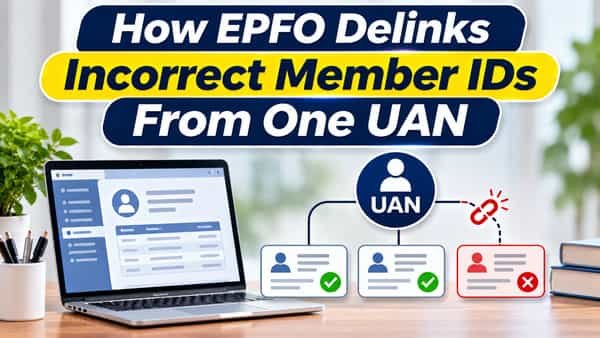
How EPFO delinks incorrect member IDs from one UAN starts mattering the day you open your service history and find an employer you’ve never worked for. It happens more often than people expect: an HR clerk types one wrong digit, a namesake with the same date of birth gets matched to your account, or an old bulk upload links records that should have stayed apart. Until 2025, untangling this meant letters to employers and visits to PF offices. EPFO’s circular of 17 January 2025 let members remove wrongly linked member IDs themselves on the portal, and a further circular in April 2026 extended the facility to member IDs where contributions had already been deposited.
| Particular | Details |
| First delinking facility | EPFO circular dated 17 January 2025 |
| Extension to IDs with contributions | EPFO circular in April 2026 |
| Who can request | The member whose UAN has the wrong member ID |
| Where | EPFO member portal, View > Service History |
| Verification | OTP to the Aadhaar-linked mobile number, with e-KYC consent |
| Reasons offered | Such as wrong mapping or employment never joined |
| Member ID with no contributions | Delinked on successful OTP verification |
| Member ID with some contributions | Request goes to the employer for approval; field office scrutiny where needed |
| Employer response window | Reported as two weeks |
| Not allowed online | Member IDs with claims or transfers processed or pending, more than a limited number of contributions, or older IDs created before 31 December 2016 |
| After delinking | The member ID can’t be re-linked to the same UAN |
| Cost | Free |
How a Stranger’s Member ID Ends Up in Your UAN
Most wrong links trace back to data entry at an employer’s end:
- A typo in the UAN. One wrong digit in a joining form can attach someone else’s employment to your account.
- Matching names and birth dates. Two employees with similar names and the same date of birth can get confused, especially in records created before Aadhaar linking became standard.
- Family members mixed up. A spouse or sibling’s UAN sometimes gets entered by mistake when one family member helps another fill forms.
- Old bulk uploads. Records migrated in the early UAN years weren’t always matched cleanly.
- Deliberate misuse. Rarely, someone’s UAN is used without their knowledge to create a member ID.
Whatever the cause, the fix is the same: the wrong member ID has to come off your UAN so your records show only your own employment.
Delink or Transfer? Get This Right First
This is the single most important point in the whole process. Delinking is only for member IDs that were never yours. It’s not a way to tidy up genuine old jobs.
| What you see in service history | Correct action |
| An employer you never worked for | Delink |
| A job you joined on paper but never actually started | Delink, choosing the “employment not joined” reason |
| A genuine past employer whose balance hasn’t moved | Transfer to your current member ID |
| Two member IDs from the same employer for genuine service | Transfer or ask the employer to reconcile |
| A genuine job with a wrong joining or exit date | Correct the date, don’t delink |
Delinking a genuine old job removes that service from your record. Since a delinked member ID can’t be re-linked to the same UAN, a mistake here is hard to undo. If you’re unsure whether an entry is yours, check old salary slips or ask the employer named in the record before doing anything.
Before You Delink: Quick Checks
- Confirm the employer name and establishment code in your service history against your own work history.
- Check the dates. A member ID covering a period when you were studying or working elsewhere is a strong sign of a wrong link.
- Look at the passbook for that member ID to see whether contributions were deposited.
- Make sure your Aadhaar-linked mobile is active, since the OTP goes there.
- Take screenshots of the service history and passbook before making changes, for your own records.
When the Wrong Member ID Has No Contributions
This is the simplest case, covered since the January 2025 circular.
- Log in to the member portal with your UAN, password and OTP.
- Open View > Service History to see every member ID linked to your UAN.
- Click Delink next to the wrong member ID.
- Confirm that you want to delink it.
- Select the reason and tick the consent boxes, including Aadhaar-based e-KYC consent.
- Click Get OTP and enter the code sent to your Aadhaar-linked mobile.
- On successful verification, the member ID is delinked and a success message appears.
Refresh the service history afterwards to confirm the record is gone.
When Contributions Have Been Paid Into It
Earlier, a member couldn’t remove a wrong member ID on their own once an employer had deposited contributions into it. The April 2026 circular changed that, within limits:
- Start the request the same way, from View > Service History, clicking Delink next to the member ID.
- Choose the reason, such as wrong mapping or employment not joined.
- Give Aadhaar-based e-KYC consent and verify with the OTP.
- The request goes to the employer’s portal. The employer checks its contribution and claim records before deciding.
- If the employer approves, reported as within two weeks, the member ID is delinked.
- EPFO field offices may scrutinise the request where needed before the change is final.
It helps to alert the employer’s HR team when you raise the request, explaining that you never worked there. A quick confirmation from them usually moves things along.
EPFO has also said separate instructions will cover what happens to balances left in delinked member IDs. That money was never yours, so it won’t be added to your account.
When the Portal Won’t Let You Delink
The online facility has guardrails to stop genuine records from being removed by mistake or misuse. A request can’t be raised online when:
- A claim or transfer has already been settled, or is pending, under that member ID
- The member ID has received more than a limited number of contributions
- The member ID was created before 31 December 2016
In these cases:
- Raise a grievance on EPFiGMS, explaining that the member ID was linked to your UAN without your knowledge, with your work history and any supporting documents.
- Contact the employer named in the record, who can confirm in writing that you never worked there.
- Approach the regional PF office that serves that employer if the grievance doesn’t resolve it.
Keep the grievance number and quote it in every follow-up.
What Happens After Delinking
- The member ID disappears from your service history and passbook list.
- It can’t be re-linked to the same UAN later, which protects your account from the same error recurring.
- Your genuine records stay untouched, including balances, transfers and pension service from your real employers.
- Future claims and transfers become simpler, since the system no longer sees employment that doesn’t belong to you.
It’s worth checking your service history once a year. A wrong link caught early, before contributions pile up or claims are filed against it, is the easiest kind to remove.
FAQs
Q1. Can I delink a wrong member ID from my UAN online?
A. Yes, you can delink it from View > Service History on the EPFO member portal using an Aadhaar-based OTP.
Q2. When did EPFO allow members to delink member IDs?
A. EPFO introduced the facility through a circular dated 17 January 2025 and extended it in April 2026.
Q3. Can I delink a member ID that has PF contributions?
A. Yes, within limits; the request goes to the employer for approval and may be checked by the EPFO field office.
Q4. Should I delink an old employer’s member ID?
A. No, genuine past employment should be transferred, not delinked, since delinking removes that service from your record.
Q5. Why can’t I see the Delink option for some member IDs?
A. IDs with settled or pending claims, too many contributions, or creation before 31 December 2016 can’t be delinked online.
Q6. Can a delinked member ID be linked back to my UAN?
A. No, once delinked, it can’t be re-linked to the same UAN.
Q7. Which mobile number receives the delinking OTP?
A. The OTP goes to the mobile number linked with your Aadhaar.
Q8. What should I do if online delinking isn’t allowed?
A. Raise a grievance on EPFiGMS and ask the employer in the record to confirm you never worked there.