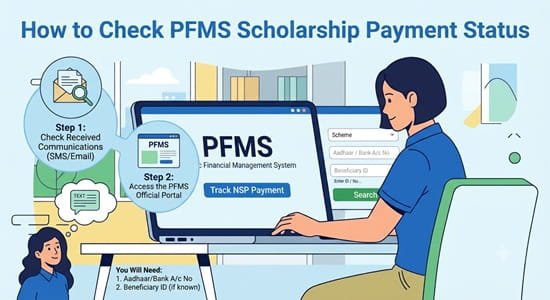
How to check PFMS scholarship payment status step by step makes more sense once you know that a scholarship passes through several desks before PFMS even sees it. Your application is verified by your institute, then by district or state nodal officers, then sanctioned by the ministry or department running the scheme. Only after that does it reach PFMS for bank validation and payment. So the most useful status check usually starts on the scholarship portal, not on PFMS. This guide follows that order: confirming your registration, reading your application status, moving to PFMS at the right moment, and handling the hold-ups that are specific to scholarships.
| Stage | What happens | Where to check |
| One Time Registration (OTR) | Your 14-digit scholarship ID is created after Aadhaar authentication | National Scholarship Portal (NSP) |
| Application submitted | Your fresh or renewal application is filed | NSP dashboard |
| Institute verification | Your institute’s nodal officer checks your details | NSP dashboard |
| District or state verification | District and state nodal officers verify the application | NSP dashboard |
| Sanction | The ministry or department approves your scholarship | NSP dashboard |
| Bank validation and payment | Your account is validated and the payment is processed | PFMS |
| Credit | Money reaches your bank account | Bank statement or passbook |
Step 1: Make Sure Your OTR Is Complete
Since academic year 2024-25, students need a One Time Registration (OTR) number to apply or check status on NSP. It’s a 14-digit number linked to your Aadhaar or Aadhaar Enrolment ID, and it stays with you for your entire academic career across schemes.
OTR uses face authentication through two Android apps: the NSP OTR app and UIDAI’s AadhaarFaceRD app. No separate fingerprint device is needed.
If you haven’t completed OTR, nothing else in this guide will work, so finish this first. Keep your OTR number saved somewhere safe, along with the password you set.
Step 2: Check Your Application Status on NSP
- Open scholarships.gov.in.
- Log in with your OTR number and password.
- Open your dashboard and select the option to check application status.
- Select the academic year and the scheme you applied for, if asked.
- Read the current status and note the date it was last updated.
Status labels can vary slightly by scheme, but you’ll commonly see something like:
| Status | What it means | What to do |
| Submitted | Your application is filed and waiting for the institute | Inform your institute’s scholarship cell |
| Verified by institute | Your institute has approved your details | Wait for district or state verification |
| Pending at district or state level | Nodal officers are reviewing it | Keep checking; follow up if it stays here long after deadlines |
| Defective | Something was incomplete or incorrect | Read the remark, correct the issue and resubmit within the allowed window |
| Rejected | Your application didn’t meet the scheme’s conditions | Check the reason and contact the institute or scheme helpline |
| Sanctioned | Your scholarship has been approved | Move to PFMS to track the payment |
| Payment transferred or processed | The payment has gone through the payment system | Confirm the credit in your bank |
Until your application shows as sanctioned, a PFMS search will usually show nothing. That’s normal and doesn’t mean anything has gone wrong.
Step 3: Move to PFMS Once Your Scholarship Is Sanctioned
NSP has a Track Your Payment link that takes you straight to PFMS’s tracking page. Choose the NSP category, enter your NSP application ID and the word verification, and check bank validation first, then the payment.
If validation is pending or has failed, the problem is usually with the bank account linked to your application, not with the scholarship itself.
Step 4: Confirm the Credit in Your Bank
Once PFMS shows the payment as processed, check your passbook, bank app or mini statement. Scholarship credits often appear with an Aadhaar-based or bulk credit label rather than the scheme’s full name.
When Your Scholarship Comes From a State Portal
Not every scholarship runs on NSP. Several states run their own scholarship portals, such as MahaDBT in Maharashtra and the Uttar Pradesh scholarship portal, with their own registration, verification and status pages.
For these:
- Check application status on the state portal, not NSP.
- Use the state portal’s payment or disbursement section if it has one.
- Expect different labels and stages, since each state designs its own workflow.
- Use PFMS’s public payment tools for the final check if the payment is routed through PFMS.
If you’re unsure which portal your scholarship belongs to, your institute’s scholarship cell can tell you.
Why Your Scholarship May Arrive in Two Parts
Some scholarships are funded jointly by the Centre and the state, and the two shares don’t always arrive together. Under the Post-Matric Scholarship for Scheduled Caste students, for instance, costs are shared 60:40 between the Centre and states. The central share is credited directly to students through DBT once the state has released its own share.
So if a credit arrives that’s smaller than the full scholarship amount, check whether it matches one share before assuming an error. The other part may still be on its way.
Scholarship-Specific Hold-Ups and Fixes
Face authentication fails during OTR.
Make sure both apps are updated and your Aadhaar biometrics aren’t locked. If you’ve locked biometrics through UIDAI’s services, unlock them temporarily before trying again. Good lighting and a plain background also help.
Application stuck at “Submitted.”
Your institute hasn’t verified it yet. Institutes have their own deadlines, so speak to the scholarship cell early instead of waiting until the last week.
Application marked defective.
Read the remark carefully. Common causes include a blurred document, mismatched marks, a wrong income certificate or missing fee receipts. Correct and resubmit before the window closes.
Name mismatch across documents.
If your name differs between your marksheet, Aadhaar and bank account (for example, initials in one and full name in another), validation can stop the payment. Bring the records into line, ideally matching your Aadhaar.
Bank account not in your own name.
Most central scholarships are paid into the student’s own Aadhaar-seeded account. A parent’s account or joint account can cause validation to fail.
Renewal not filed.
Scholarships usually need a renewal application each year. Missing it means no payment for that year, even if you received the scholarship before.
Details Worth Saving
Keep these together in one place, either on paper or in a note on your phone:
- OTR number and password
- NSP application ID for each year
- Scheme name and academic year
- Bank account number and branch
- Screenshot of the “sanctioned” status with date
- Institute’s scholarship cell contact
With these handy, any follow-up with your institute, the NSP helpdesk or your bank is faster and clearer.
FAQs
Q1. Where should I check my scholarship status first, NSP or PFMS?
A: Start on NSP, since PFMS usually shows nothing until your scholarship is sanctioned.
Q2. What is the OTR number on NSP?
A: It’s a 14-digit One Time Registration number linked to your Aadhaar, used for all your scholarship applications.
Q3. Which apps are needed for NSP face authentication?
A: You need the NSP OTR app and UIDAI’s AadhaarFaceRD app on an Android phone.
Q4. What does “defective” mean in NSP application status?
A: It means your application has an error or missing document, which you need to correct and resubmit within the allowed time.
Q5. Why did I receive only part of my scholarship amount?
A: In jointly funded schemes, the central and state shares can arrive separately, so the rest may still be on its way.
Q6. Can my scholarship be paid into my parent’s bank account?
A: Most central scholarships require the student’s own Aadhaar-seeded account, so a parent’s account may fail validation.
Q7. How do I check state scholarship payment status?
A: Use your state’s scholarship portal for application status, then confirm the final credit through PFMS or your bank.
Q8. Do I need to apply again every year for a scholarship?
A: Yes, most scholarships require a renewal application each year to continue receiving payments.