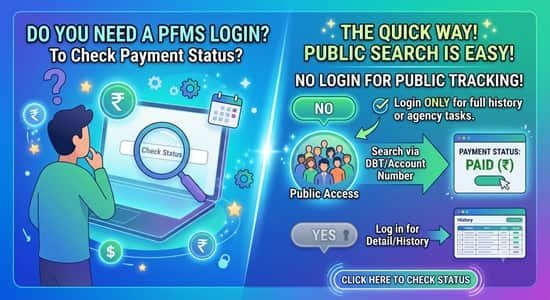
Do you need a PFMS login to check payment status? For almost everyone who asks, no. Students, farmers, workers, suppliers and taxpayers waiting on a refund can all check government payments from the public side of the portal. There is one group that does need a personal login, and it’s the group that least expects it: central government employees who want to see their own pay slips and provident fund details. This guide sorts out which check needs what, so you don’t waste an afternoon hunting for a password you were never meant to have.
| What you want to check | Where on PFMS | What you’ll need | Login needed? |
| Any government credit to your bank account | Know Your Payments | Bank name, account number, captcha, OTP if prompted | No |
| A DBT benefit linked to an application | DBT Status Tracker | Application ID, beneficiary code or account number | No |
| A central scholarship | Track NSP Payments | NSP application ID and bank details | No |
| MGNREGA wage transfer | FTO status | Fund Transfer Order (FTO) number | No |
| GST refund bank validation and payment | GSTN Tracker | GST refund details | No |
| Payment to a vendor or supplier | Know Your Payments | The bank account that received the payment | No |
| Your monthly salary slip or GPF details as a central government employee | Employee Information System (EIS) | Employee login ID and password | Yes |
| Scheme-wide payments made by your office | Agency or DDO dashboard | Official user ID | Yes |
Why a Payment Check Doesn’t Need an Account
The public tools are built around your bank account, not around a PFMS profile. Your account number and bank tell the system where to look, and an OTP to the mobile number registered with your bank, when asked for, confirms you’re the person who should see the result.
A PFMS login wouldn’t show a beneficiary anything extra anyway. Logins exist for people who prepare, approve or account for payments. Their screens show payment files, budget heads and agency balances, none of which tells a scholarship student more than the public tracker already does.
What to Keep Handy Before You Check
Most failed searches come down to a wrong input, not a missing payment. A quick checklist:
- The bank’s current name. Several public sector banks merged in 2019 and 2020. If your passbook still says Vijaya Bank, Dena Bank, Oriental Bank of Commerce, United Bank of India, Syndicate Bank, Andhra Bank, Corporation Bank or Allahabad Bank, select the bank it merged into: Bank of Baroda, Punjab National Bank, Canara Bank, Union Bank of India or Indian Bank, as applicable.
- The full account number. Copy it from your passbook or bank app instead of typing from memory.
- Your phone. If an OTP is triggered, it goes to the number your bank has on record, which may be an old number you no longer use.
- Your application ID or beneficiary code for scheme-linked trackers, available from the scheme portal or your application acknowledgement.
- Patience with captchas. They’re case-sensitive. Refreshing is faster than guessing.
Two Public Trackers Most People Don’t Know About
MGNREGA FTO Status
MGNREGA wages are paid through Fund Transfer Orders, batches that list workers and amounts. PFMS lets anyone check where an FTO stands by entering its number. Workers rarely have this number themselves, but the gram panchayat or the block programme office can share it. Once you have it, you can see whether the batch has been processed and sent for payment, which settles most “has the money even left?” questions.
GSTN Tracker
Businesses waiting for a GST refund can follow two things here: whether their bank account has been validated for the refund, and whether the refund itself has been processed. A refund stuck at account validation needs a fix in the bank details, not another reminder to the tax office.
The Exception: Central Government Employees
Here’s where a personal login is genuinely required. Central government employees whose salaries are processed through the Employee Information System, a module integrated with PFMS, get their own employee login. With it, they can:
- View, print or download the pay slip for any month processed through EIS
- See personal, posting, pay and PF or NPS details entered by their office
- Check GPF details, if they’re covered under GPF
- Use the savings form for income tax calculations
How the login gets created. You don’t apply for it on the website. Your Drawing and Disbursing Officer enters your details in EIS, and a login ID becomes available once at least your mobile number and government email address are on record.
First sign-in. The default password is your date of birth in DDMMYYYY format, for example 05081988. The system makes you change it the first time you log in.
Finding the pay slip. After logging in, open the Employee Information System section and choose the pay slip option, then select the year and month.
If you can’t get in. First confirm with your DDO that your mobile and email are in EIS. If they are and login still fails, the EIS support team can be reached at pfms-eis@gov.in. Mention your employee code and your DDO code so they can find your record.
Pensioners are a different case. Central civil pensions are handled by the Central Pension Accounting Office, which has its own channels, so a PFMS login isn’t the route for pension queries.
When Someone Asks for Your PFMS Details
Since genuine payment checks don’t need a login, any request for one deserves suspicion. Real PFMS tools never ask you to:
- Pay a fee to “release,” “activate” or “speed up” a payment
- Share your net banking password, ATM PIN or card CVV
- Read out an OTP to a caller claiming to be from PFMS or a ministry
- Install an app to “register for PFMS”
Government departments don’t call beneficiaries to collect OTPs. If you’ve shared one, contact your bank immediately and ask them to block online access until you’ve changed your credentials.
FAQs
Q1. Can central government employees see their salary slip on PFMS?
A: Yes, through the Employee Information System, using the employee login created after their DDO enters their details.
Q2. What is the default password for a PFMS employee login?
A: It’s the employee’s date of birth in DDMMYYYY format, which must be changed at first login.
Q3. Who should I contact if my PFMS employee login doesn’t work?
A: Check with your DDO first, then email pfms-eis@gov.in with your employee code and DDO code.
Q4. How can I check MGNREGA payment status on PFMS?
A: Use the FTO status option with the Fund Transfer Order number, which your gram panchayat or block office can provide.
Q5. Can I track my GST refund on PFMS?
A: Yes, the GSTN Tracker shows bank account validation status and whether the refund has been processed.
Q6. My bank merged with another bank. Which name should I select?
A: Select the bank your old bank merged into, such as Bank of Baroda for former Vijaya Bank or Dena Bank accounts.
Q7. Is there any fee for checking payment status on PFMS?
A: No, all public payment checks on PFMS are free.
Q8. Can a supplier check a government payment on PFMS?
A: Yes, suppliers can check payments received in their bank account through Know Your Payments without logging in.