How to check PFMS payment status online is mostly a question of order. Many people jump straight to the payment search, find nothing, and assume the money was never sent. In reality, a payment can’t even be created until your bank account passes validation, so an empty payment result often means the problem sits one stage earlier. Checking in the right sequence (validation first, then the payment stage, then the actual credit) tells you exactly where your money is and who can move it along. This guide walks through each screen and shows how to read what you see.
| Order | What you’re confirming | Where to check | What you’ll need |
| 1 | Your bank account has been validated for the scheme | DBT Status Tracker, Beneficiary Validation | Application ID, Beneficiary Code or account number |
| 2 | Your payment has been approved and sent | DBT Status Tracker, Payment | Same as above |
| 3 | The money has reached your account | Know Your Payments | Bank name and account number |
| 4 | Your Aadhaar is mapped to the right account (Aadhaar-based payments) | NPCI’s BASE portal | Aadhaar number and OTP |
Method 1: Check Validation Status on the DBT Status Tracker
Start here, especially if you’ve applied for a scheme recently.
- Open pfms.nic.in in your browser.
- Go to the Payment Status menu and click DBT Status Tracker.
- Select the category. Choose NSP for central scholarships. For other schemes that send beneficiary data to PFMS from their own portals, choose the external system option, such as “Any Other External System.”
- Choose “Beneficiary Validation” under DBT Status.
- Select your bank by typing the first few letters of its name and picking it from the list.
- Enter one identifier: your Application ID, your Beneficiary Code or your account number. You only need one.
- Type the word verification exactly as shown. It’s case-sensitive.
- Click Search.
Two identifiers confuse people here. The Application ID is the registration number you got when you applied on the scheme’s portal. The Beneficiary Code is a PFMS ID assigned to you only after your account passes validation, so if you don’t have one yet, use the Application ID.
If validation has been pending for more than three days, it’s worth following up with your institute or the scheme office, since nothing moves to the payment stage until it clears.
Method 2: Track the Payment Stage on the Same Screen
Once validation shows as complete, switch to the payment view.
- Stay on the DBT Status Tracker and keep the same category.
- Choose “Payment” under DBT Status.
- Enter the same identifier and the word verification.
- Click Search.
The result shows your payment as a timeline, with a date and time stamp at each stage. A typical record moves through:
| Stage on screen | What it means | Who acts at this stage |
| Request date | Your payment request was created | Scheme portal or agency |
| Validation status: validated | Your account details were accepted | Bank, through PFMS |
| Fund status: approved by agency | The implementing agency approved the payment | Implementing agency |
| Treasury status: treasury signed | The treasury digitally signed off on the release | State or central treasury |
| Bank processing and credit | The payment went to your bank for credit | Your bank |
The timestamps are the useful part. They show not just where a payment is, but how long it has been sitting there.
Reading Where a Payment Is Stuck
Use the last completed stage to decide who to contact:
- Stuck before “approved by agency”: the implementing agency hasn’t cleared the payment batch yet. The scheme office or your institute can tell you when the next batch is due.
- Approved but not treasury signed: the payment is waiting at the treasury. This usually clears on its own, often in batches.
- Treasury signed but no credit: the payment has left government hands and is with the bank. Move to Method 3 to confirm the credit, and if it isn’t there, your bank branch is the right contact.
- No record at all: your application may not have been forwarded to PFMS yet, or the search window has passed. Check your application status on the scheme portal first.
Take a screenshot of the timeline before you call anyone. Officials can act faster when they see the exact stage and timestamp.
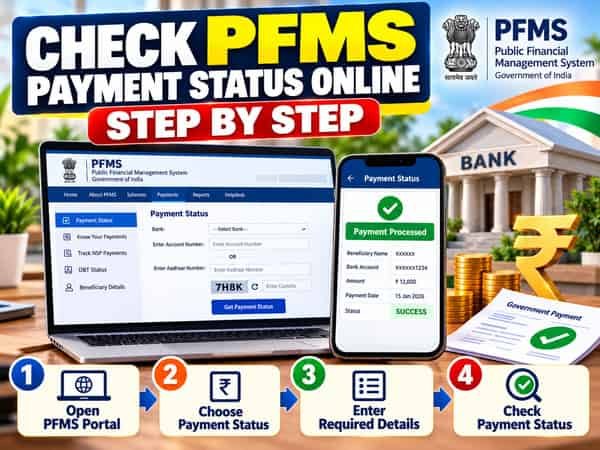
Method 3: Confirm the Credit Through Know Your Payments
This is the final proof that money reached your account.
- Open pfms.nic.in and go to Payment Status, then Know Your Payments.
- Select your bank from the list.
- Enter your account number, then enter it again in the confirmation box.
- Type the captcha shown on screen.
- Click Search or the option to send an OTP, depending on what the page shows.
- Enter the OTP sent to the mobile number registered with your bank, if prompted.
- Review the list of government payments credited to that account.
The results typically include the payment date, amount, the scheme or paying agency, and a transaction reference. Note down the reference number. If your bank statement doesn’t show the credit, your bank can trace it using that number.
Method 4: Check Aadhaar Mapping on NPCI’s BASE Portal
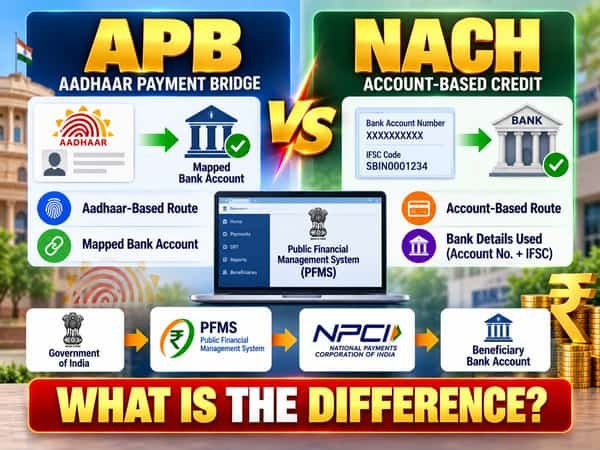
For Aadhaar-based payments, the money goes to whichever bank account is currently mapped to your Aadhaar. You can check this yourself on NPCI’s website through its Bharat Aadhaar Seeding Enabler (BASE) service.
- Visit npci.org.in and find the BASE service, usually listed under the consumer section.
- Select the option to check Aadhaar mapped status.
- Enter your Aadhaar number and the captcha.
- Enter the OTP sent to your Aadhaar-linked mobile number.
- Read the result, which shows the bank your Aadhaar is mapped to and whether it’s enabled for DBT.
If the mapped bank isn’t the one you expected, visit the branch of the bank where you want payments and ask them to seed and map your Aadhaar there.
Tips for a Smoother Search
- Check validation and payment separately. They’re two different searches on the same screen, and mixing them up is the most common reason people see “no record.”
- Search with the Application ID first for new applications, since the Beneficiary Code comes later.
- Save your results. A dated screenshot is the best record you can carry to a scheme office or bank.
- Recheck after a few working days rather than several times a day. Stages update in batches.
- Use the scheme portal alongside PFMS. It shows eligibility and approval, which PFMS doesn’t.
FAQs
Q1. Which category should I select in the DBT Status Tracker for a scholarship?
A. Select NSP for central scholarships applied for through the National Scholarship Portal.
Q2. What is a Beneficiary Code in PFMS?
A. A Beneficiary Code is a PFMS ID assigned to a beneficiary after their bank account is validated. It is usually available on the relevant scheme’s portal.
Q3. Should I check validation or payment status first?
A. Check the validation status first, because a payment cannot be created until the beneficiary’s bank account has been successfully validated.
Q4. What does “treasury signed” mean in PFMS payment status?
A. “Treasury signed” means the treasury has digitally approved the payment release and the payment is moving forward for processing by the bank.
Q5. What should I do if validation is pending for more than three days?
A. Contact your institute or the concerned scheme office and ask them to follow up on the pending bank account validation.
Q6. Can I use my account number in the DBT Status Tracker?
A. Yes. You can search for your DBT status using your Application ID, Beneficiary Code, or bank account number.
Q7. How do I check which bank account my Aadhaar is linked to for DBT?
A. Use the BASE service on NPCI’s website and verify your details using your Aadhaar number and OTP.
Q8. What details should I note from Know Your Payments?
A. Note the payment date, amount, scheme name, and transaction reference number. These details can be useful when following up with your bank or the concerned scheme authority.