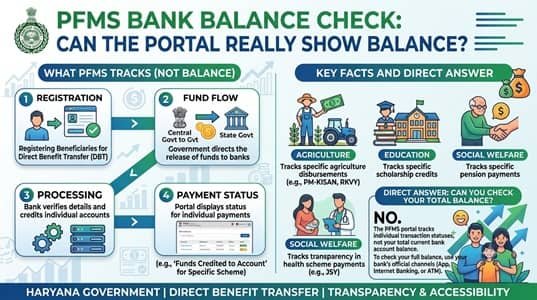
PFMS bank balance check works, but only for one kind of account: the bank accounts of government agencies that handle scheme funds. For an individual, whether a student, farmer, pensioner or employee, PFMS can’t show your savings account balance at all. It can confirm that a government payment reached your account, but it has no view of anything else in it. Plenty of websites and videos promise a “PFMS balance check,” which is why so many people end up confused. This guide explains exactly what the portal can and can’t see, the reliable ways to check your own balance, and how balances actually work for agencies.
| Account type | What PFMS shows | Balance visible on PFMS? |
| Beneficiary’s savings account | Government payments credited to it | No |
| Employee’s salary account | Pay slips through EIS | No |
| Vendor’s or supplier’s account | Government payments received | No |
| Implementing agency’s scheme account | Bank balance shared through core banking integration | Yes, to authorised users |
| Single or Central Nodal Account | Main account balance for the scheme | Yes, to authorised users |
| Zero-balance subsidiary account | Remaining drawing limit | Balance stays at zero by design |
| Scheme-wise funds in a shared account | Book balance per scheme recorded in PFMS | Yes, as a book figure |
Why PFMS Can’t See Your Personal Balance
PFMS only interacts with your bank account at two moments: when the account is validated for a scheme, and when a government payment is sent to it. Each time, the bank sends back a response confirming whether the account is valid or whether the credit went through. That’s the full extent of the connection.
Your salary, ATM withdrawals, UPI transfers and shopping payments never pass through PFMS, so it has no way of knowing your running balance. Banks also keep customer account details confidential, and a government payment platform has no reason to hold them.
The practical takeaway is simple. Any website or app that claims to show your full account balance “through PFMS” isn’t using PFMS. Don’t enter your account number, card details or OTP on such sites.
Real Ways to Check Your Own Balance
Your bank is the only source of your balance. Here are the options, from the most convenient to the ones that work without internet:
- Mobile banking or net banking. Your bank’s own app or website shows the balance and full statement instantly.
- Any UPI app. If your account is linked to a UPI app, use its check-balance option and enter your UPI PIN.
- *99# on any phone. NPCI’s USSD service works even on basic phones without internet. Dial *99# from your bank-registered mobile number, pick your language, choose the balance option and enter your UPI PIN. You’ll need UPI set up on the account first.
- Missed call or SMS banking. Most banks offer a balance enquiry number you can call or text from your registered mobile. Find the exact number on your bank’s official website or passbook, not on random search results.
- Any ATM gives a balance enquiry with your debit card. Your own bank’s ATMs don’t count towards free transaction limits in the same way, so check your bank’s rules if you use other banks’ machines often.
- Passbook update. Visit your branch or a passbook printing kiosk for a printed record of every transaction.
- Aadhaar-based enquiry at a bank mitra. If your account is linked to Aadhaar, a bank mitra or customer service point can check your balance through the Aadhaar Enabled Payment System using your Aadhaar number and fingerprint. A mini statement is also available this way. This is particularly useful in villages without a branch or ATM nearby.
Where PFMS Does Show Balances: Agency Accounts
The picture is completely different for organisations that receive government funds. PFMS is integrated with banks’ core banking systems, and that integration allows near real-time account validation, fund transfers and viewing of implementing agencies’ bank balances. Transaction data flows between PFMS and banks daily.
This gives authorised users several things they couldn’t get otherwise:
- Live visibility of scheme accounts without waiting for monthly bank statements
- Bank balance reports across agencies, which programme divisions use for monitoring
- A check on unspent funds before a fresh release, as required under Rule 230(7) of the General Financial Rules, which says the unspent balance of an earlier grant must be considered when sanctioning the next one
Only users with the right role in PFMS can see these balances. Agency staff see their own accounts, while ministries and programme divisions see the agencies under their schemes.
Bank Balance vs Book Balance
Agencies often notice that the balance PFMS fetches from the bank doesn’t match the figure in their own scheme records. Both can be correct, because they measure different things.
Bank balance is what the bank actually holds in the account today.
Book balance is what the agency’s records in PFMS say should be available for each scheme. When one bank account handles several schemes, the EAT module keeps a separate book balance for each scheme, even though the money sits in a single account.
Common reasons the two figures differ:
- Payments approved in PFMS but not yet debited by the bank
- Failed payments returned to the account but not yet re-processed
- Interest credited by the bank, which under SNA and CNA rules belongs to the government and must be remitted to the Consolidated Fund of India
- Bank charges debited without a matching entry
- Receipts deposited but not yet recorded in PFMS
Agency accountants who reconcile these items regularly rarely face surprises at year-end. A good habit is to review the gap weekly and record the reason for every difference.
Why a Zero-Balance Account Always Shows Zero
District and block offices working under a nodal account often see a balance of ₹0 and assume something is wrong. It isn’t. Their zero-balance subsidiary accounts are designed to hold nothing, drawing funds from the main account only at the moment a payment is made. For these offices, the number that matters is the remaining drawing limit, not the balance. If the limit is running low, the request goes to the nodal agency that sets it.
A Quick Word on Fake “Balance Check” Services
Because “PFMS balance check” is such a common search, it attracts copycat websites, YouTube shortcuts and apps. Before using any service, remember:
- PFMS doesn’t offer a personal balance check in any form.
- Government portals don’t charge fees for payment or balance information.
- Your bank’s app, ATM, *99# or branch are the only places your real balance comes from.
FAQs
Q1. Can I check my bank balance on PFMS?
A: No, PFMS only shows government payments credited to your account, not your account balance.
Q2. How can I check my bank balance without internet?
A: Dial *99# from your bank-registered mobile number, or use your bank’s missed call or SMS balance service.
Q3. Can agencies see their bank balance on PFMS?
A: Yes, authorised users of implementing agencies can view their scheme account balances through PFMS’s integration with core banking systems.
Q4. Why does my zero-balance subsidiary account show ₹0 on PFMS?
A: It’s designed to hold no money and draws from the nodal account only when payments are made, so check the remaining drawing limit instead.
Q5. What is the difference between bank balance and book balance in PFMS?
A: Bank balance is what the bank holds, while book balance is the scheme-wise amount recorded in PFMS by the agency.
Q6. Can I check my balance using Aadhaar?
A: Yes, if your account is linked to Aadhaar, a bank mitra can check your balance through AePS using your Aadhaar number and fingerprint.
Q7. Is there any official PFMS app for balance check?
A: No, PFMS doesn’t offer any personal balance check, so apps claiming to do so aren’t official.
Q8. Why do ministries check agency balances on PFMS before releasing funds?
A: Rule 230(7) of the General Financial Rules requires the unspent balance of an earlier grant to be considered before sanctioning the next one.