Is there an official PFMS app? Yes, but it probably isn’t the one you’re looking for. The National Informatics Centre has published a “Public Financial Management System” app on Google Play, yet it’s built for bank nodal officers and scheme managers who monitor pending payments, not for farmers, students or pensioners checking a credit. For citizens, there’s no dedicated PFMS app at all. That gap is exactly what fake apps try to fill, often with dangerous results. This guide explains what the official app does, how to check PFMS payments on a phone without any app, which genuine government apps cover parts of the payment journey, and how to spot a fake.
| Particular | Details |
| Official app name | Public Financial Management System |
| Listed developer | National Informatics Centre |
| Platform | Android (Google Play) |
| Intended users | Bank nodal officers and scheme managers |
| Login | Registered PFMS users, with OTP-based sign-in |
| What it shows | Bank-related performance indicators, pending payment transactions and pending account validations |
| Citizen PFMS app | None |
| Citizen option on mobile | PFMS website in a phone browser |
| Approvals and signing | Still need a configured computer |
| Cyber fraud helpline | 1930, and cybercrime.gov.in |
What the Official PFMS App Actually Does
The official app is a monitoring tool. Its Play Store description says it provides information on bank-related key performance indicators within PFMS. Bank nodal officers and scheme managers use it to keep an eye on:
- Pending payment transactions, so delays can be followed up with banks
- Pending beneficiary account validations, which hold up new payments
- Other indicators that show how well banks and schemes are processing government payments
Only users already registered on PFMS can sign in, and access works through a secure OTP-based system. The listing describes it as a first version, with more features planned.
What it doesn’t do matters just as much. The app can’t approve or sign payments, can’t register new users and doesn’t offer citizen payment checks. It’s a dashboard for officials, not a replacement for the PFMS website.
Why There’s No Citizen PFMS App
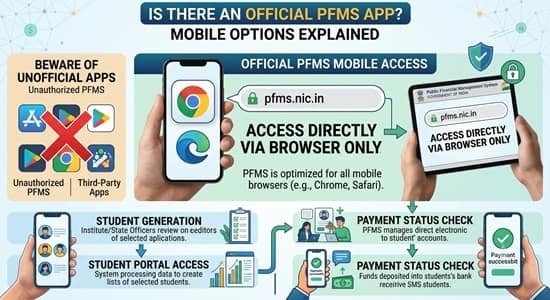
Citizens don’t actually need one. Every public PFMS payment check works through a browser using details you already have: your bank name, account number and an OTP. Eligibility and application details sit with each scheme, not with PFMS, so scheme apps are better placed to show those. A separate PFMS app would only duplicate what the mobile website and scheme apps already offer.
Checking PFMS Payments on Your Phone
The PFMS website works on a phone browser. A few habits make it smoother:
- Type pfms.nic.in directly into Chrome or another browser rather than tapping a link from a message.
- Switch to desktop view if menus don’t appear properly. In Chrome, open the three-dot menu and tick “Desktop site.”
- Rotate the phone to landscape for wide result tables.
- Keep the bank-registered mobile handy. OTPs for payment checks go to the number your bank has on record.
- Create a home-screen shortcut. In Chrome, open the three-dot menu and choose “Add to Home screen.” You’ll get an icon that opens the real site, without installing anything.
That last tip gives you app-like convenience with none of the risk of downloading an unknown app.
Official Apps That Cover Parts of the Journey
Several genuine government apps handle pieces of the payment process for specific schemes or tasks:
| App or service | Run by | Useful for |
| PM-KISAN app | Ministry of Agriculture and Farmers Welfare | Farmer registration, instalment status and face-based e-KYC |
| NSP OTR app with AadhaarFaceRD | National Scholarship Portal and UIDAI | Scholarship One Time Registration through face authentication |
| UMANG | Government of India | Several services, including NSAP pension status and payment details |
| Sandes | National Informatics Centre | Receiving OTPs for PFMS official logins |
| Your bank’s app or any UPI app | Your bank or UPI provider | Checking balance and transaction history |
| USSD codes on any phone | NPCI | Balance checks and Aadhaar mapping without internet |
Download these only from the official Play Store or App Store listings, ideally by following a link from the department’s own website.
How to Spot a Fake “PFMS App”
Search for “PFMS app” and you’ll find lookalikes promising instant payment status, balance checks or even “pending money release.” Some are just ad-filled copies of public information. Others are designed to steal bank details. Before installing anything, check:
- Developer name. Official apps are usually listed under NIC, a ministry or a recognised government body. A personal name or unknown company is a warning sign.
- Where the link came from. Government departments don’t send app files on WhatsApp or SMS. An APK file shared in a chat, especially one named after PM-KISAN, PFMS or a scholarship, is a common fraud trick.
- Permissions requested. Be wary of apps asking to read your SMS, use accessibility services or control your screen. These can capture OTPs.
- What it asks you to enter. No genuine payment check needs your UPI PIN, ATM PIN, card details or net banking password.
- What it promises. Apps claiming to “release” or “speed up” government payments for a fee are fraudulent.
- Downloads and reviews. Very few downloads, copied descriptions or reviews complaining of lost money are clear red flags.
If you’ve already installed a suspicious app:
- Uninstall it immediately.
- Call your bank to block online banking and cards if you entered any details.
- Change your banking passwords and UPI PIN from a safe device.
- Report the fraud on the national cyber crime helpline, 1930, or at cybercrime.gov.in.
Acting within the first few hours gives the best chance of stopping a fraudulent transfer.
For Officials: What Still Needs a Computer
Even with the official app, the core PFMS work for agencies, DDOs and treasuries stays on a desktop. Digital signature approvals and FIDO sign-in for treasury users depend on hardware and software that phones don’t support. The app is best treated as a quick way to spot problems on the move, with the actual fixes done on a configured computer.
FAQs
Q1. Is there an official PFMS app?
A: Yes, an official app by the National Informatics Centre exists, but it’s meant for bank nodal officers and scheme managers.
Q2. Can citizens check payments on the official PFMS app?
A: No, it only works for registered PFMS users and shows monitoring indicators, not personal payment checks.
Q3. How can I check my PFMS payment on a mobile phone?
A: Open pfms.nic.in in your phone browser and use the public payment tools with your bank details.
Q4. Can I add PFMS to my phone’s home screen?
A: Yes, in Chrome choose “Add to Home screen” from the menu to create a shortcut to the real website.
Q5. Which official apps help with scheme payments?
A: The PM-KISAN app, NSP OTR app and UMANG help with scheme-specific registration, status and payment details.
Q6. Are PFMS apps shared on WhatsApp safe?
A: No, government departments don’t send app files on WhatsApp, so such APKs should never be installed.
Q7. What should I do if a fake PFMS app took my bank details?
A: Uninstall it, call your bank to block access, change your credentials and report it on 1930 or cybercrime.gov.in.
Q8. Can PFMS approvals be done on a phone?
A: No, signing and approving payments need a configured computer with DSC or FIDO support.